This is the beginning of the Pulse Shape analysis for the HVSi detector used in run 62. So far I have plotted 50V HV4 Triggered Data from two days during the run. I was attempting to also plot the zero volt data but I was having trouble finding the directories they may have been stored in.
The following sets of figures corresponds to data from the 07170427_917 without any cuts applied. I had at first tried to combine the two HV4 Triggered series from the same day but noticed there was a gain difference or apparent gain difference between the two series, despite having the same overall driver gain. The second series was take on the same day following a flash. This series took place at 1720. This spontaneous gain chain has been observed before in Run 62. Below I have plotted examples of the observed gain change in PD, interestingly, none of the other channels really seem to be affected.
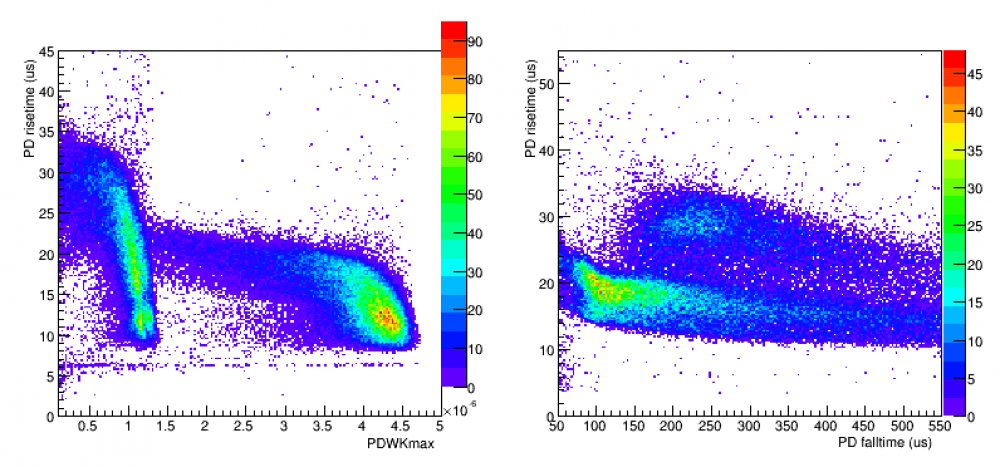
With this in mind, I decided to combine the data for both series in all channels except for PD. These are plotted below:
| Channel A Risetime vs. PKWKmax and Rise vs. Fall | Channel B Risetime vs. PKWKmax Rise vs. Fall |
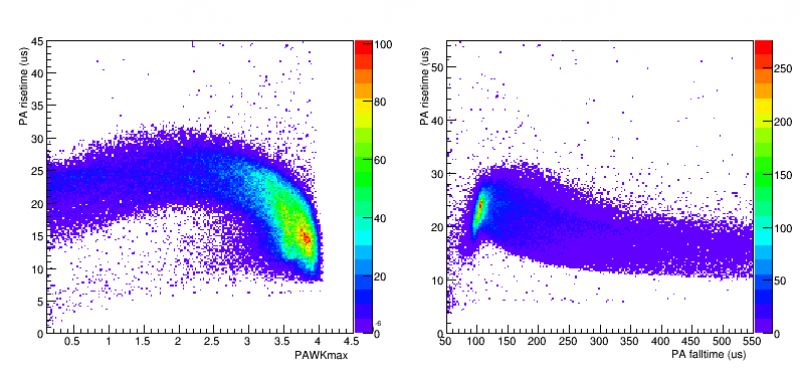 | 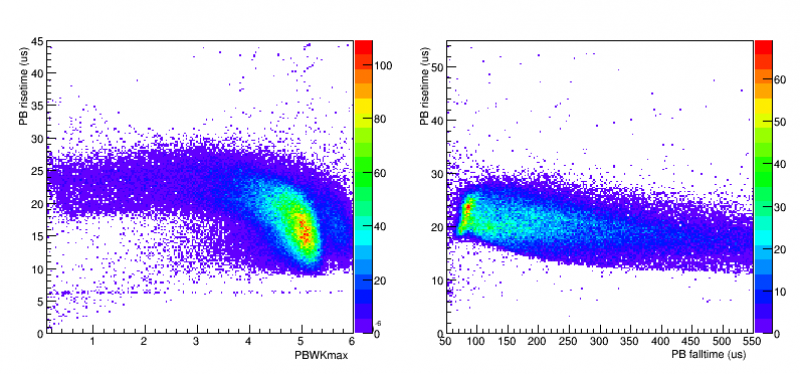 |
| Channel C Risetime vs. PKWKmax Rise vs. Fall | |
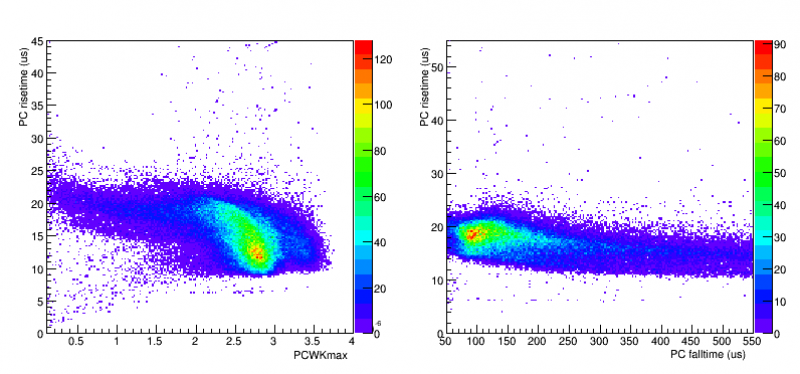 | |
| Channel E Risetime vs. PKWKmax Rise vs. Fall | Channel F Risetime vs. PKWKmax Rise vs. Fall |
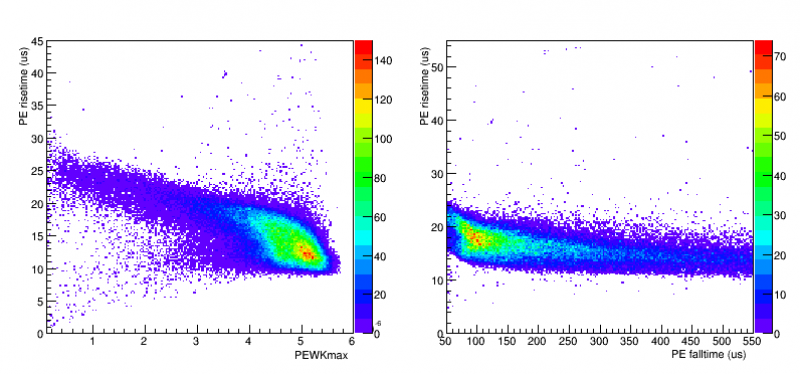 | 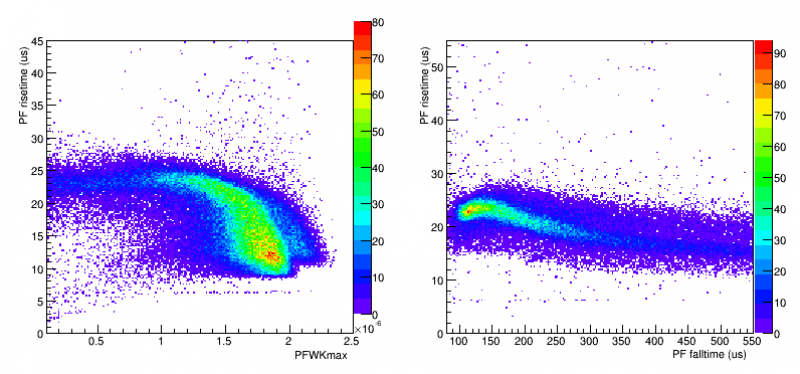 |
And Finally, here is the same data for both the 917 series and the 1720 series plotted separately or PD:
| PD data for series 917 | PD data for series 1720 |
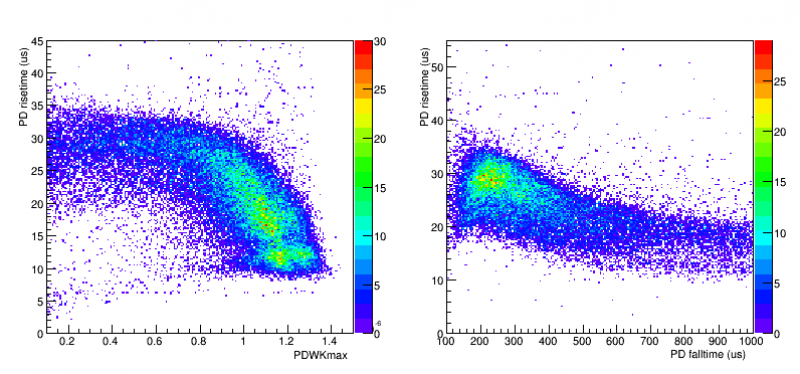 | 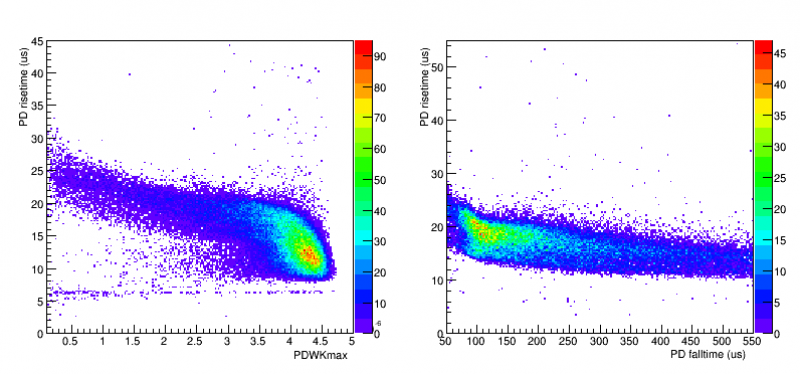 |
In either case, the next step is fairly clear, applying the appropriate cuts to the data. One necessary cut is found in the data around the “hotspots” of the figures that appear to correspond to a short risetime and a rather large pulse size. This, in the most likely scenario, would correspond to events that caused the TES in that particular channel to rail, the only difficult thing is finding a decent cut parameter. I tried a few methods, and each, while effective, did not eliminate ALL of the bad events and in fact sometimes omitted “good” events. The two methods I tried was a cut based on PKWKmax which, while effective, ends up throwing out a large number of “good” events, and another cut based of PTINTall which didn't appear to cut enough events.
The most common “bad” events that were omitted due to PTINTall were pile-up events that the PKWKmax cut could miss. This makes sense as the integral would continue to grow much faster for a pile-up event than say, a saturation event. The tricky party seems to be able to find a cut that both cuts out the saturation events and the pile-up events. In general I am fine with having some “bad” events kept and some “good” events omitted, it just appears that these rudimentary cuts are not sufficient and a more in depth cut needs to be applied.
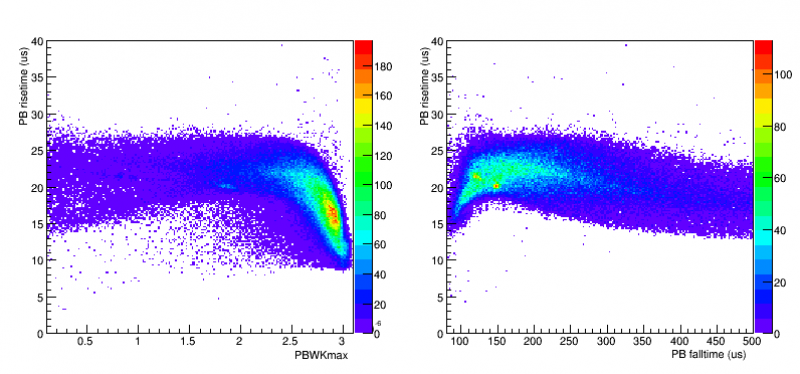
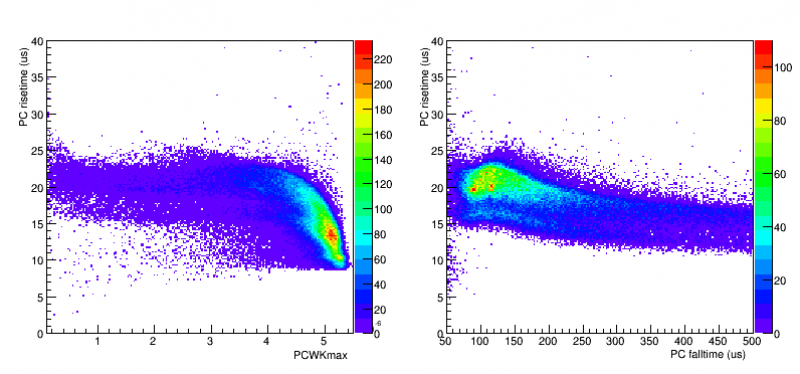
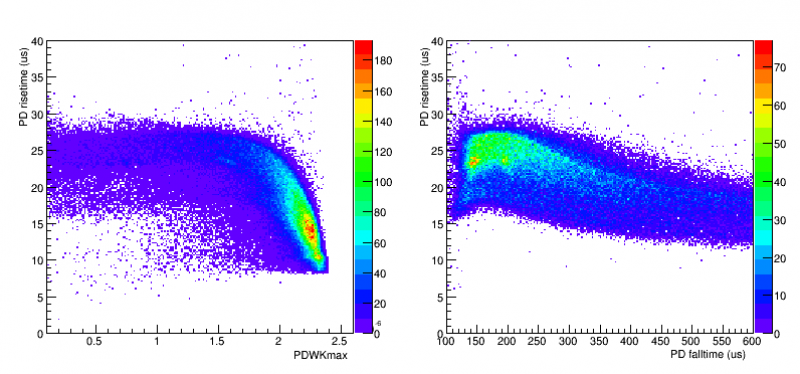
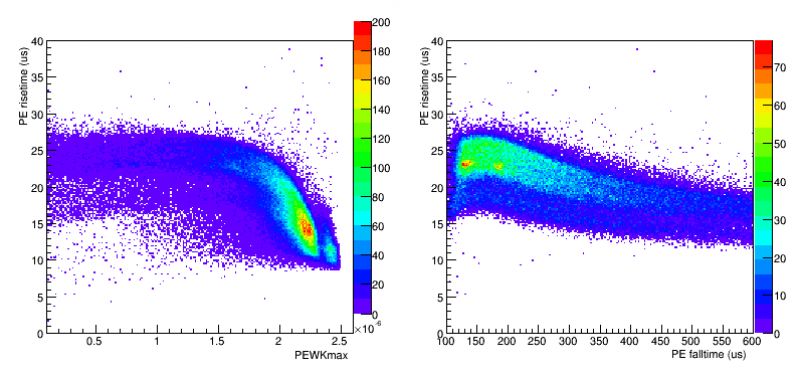
Since I am struggling to find a decent way to cut the data, I'm going to switch to a run with a more well known energy spectrum such as one with just the Am source instead of the PuBe source as above. The following is self-triggered, 50V, background data with an internal Am source taken on 07170401 at 711, 811, and 911. All of these events had PAWKmax set to zero since PA was not working during this time.
| Channel B Risetime vs. PKWKmax and Rise vs. Fall | Channel C Risetime vs. PKWKmax Rise vs. Fall |
 |  |
| Channel D Risetime vs. PKWKmax Rise vs. Fall | |
 | |
| Channel E Risetime vs. PKWKmax Rise vs. Fall | Channel F Risetime vs. PKWKmax Rise vs. Fall |
 | 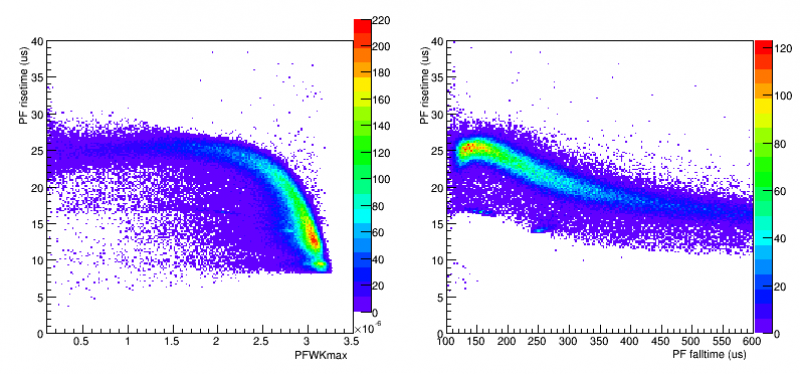 |
With these plotted in full I am now adding some energy calibration cuts. I first apply some cuts to PFINTall/PTINTall in order to get rid of the large number of “noise events” as well as randoms. Now, Plotting PFINTall/PTINTall vs. PTINTall, I am able to pick out what would correspond to the the Am energy peaks. Again applying some cuts in PTINTall and PFINTall/PTINTall, I separate out the peaks in a way that is resolvable after plotting PTOFamps as below:
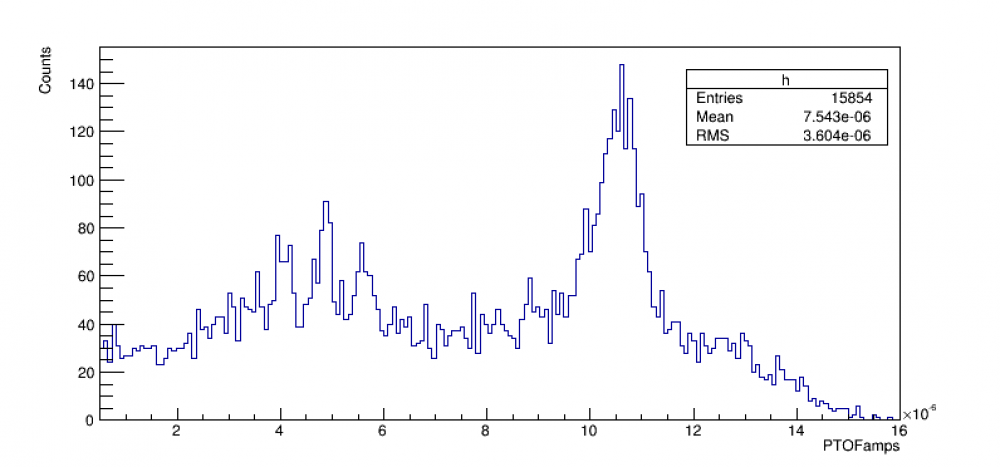
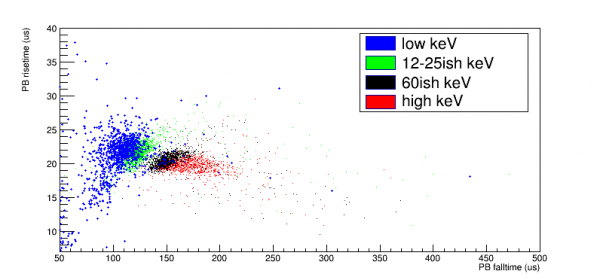
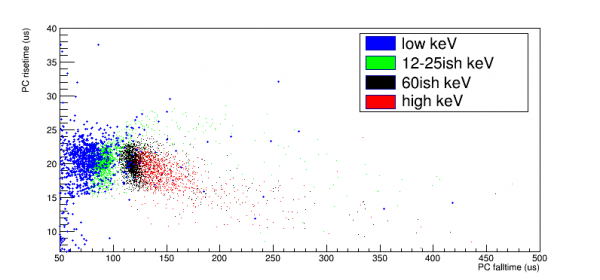
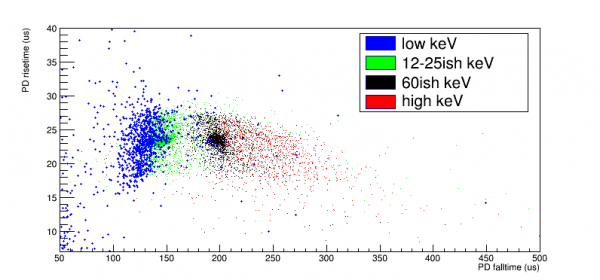
I can now use this figure to apply cuts in PTOFamps so as to pick out the different Am energy peaks and to plot them against each other. I then create four cuts, one designed to pick out the 60keV peak, one for 12-25 keV, one for energy lower than those peaks, and one for energy higher than 60keV. I then take all of those events and plot their rise time vs. fall time on the same figure resulting in the following: (NOTE: the blue points are enlarged to make up for low statistics). I will also note that this includes the PFINTall/PTINTall cut and is being triggered on channel E.
| Energy cut for PB | Energy cut for PC | Energy cut for PD |
 |  |  |
| Energy cut for PE | Energy cut for PF | Energy cut for PT |
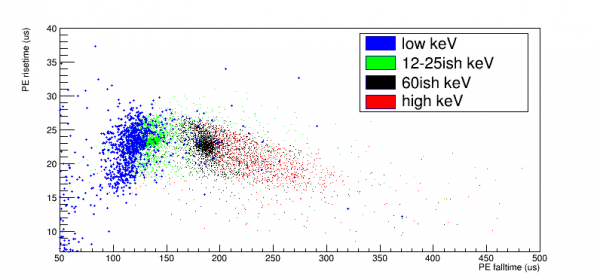 | 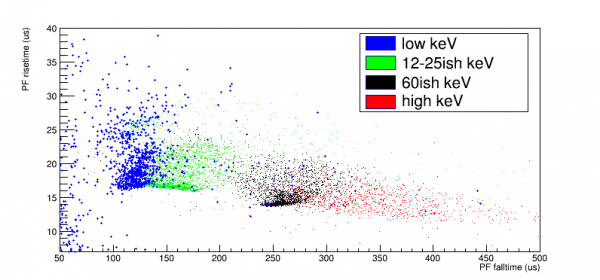 | 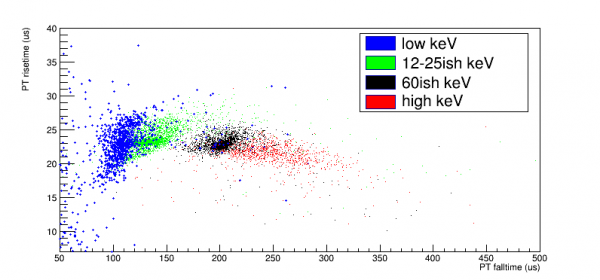 |
Based on the source being Am, and it internally being “aimed” toward the center, PF, channel, it somewhat makes sense that it has the largest spread of rise times, vs. run times than the other channels. The common factor of the higher energy pulses generally having a quicker rise time and longer fall time could maybe have something to do with railing, and a sort energy event scaling. It's clear by simply plotting P*WKmax that for whatever channel you are in, the max pule height does increase with energy (which is expected).
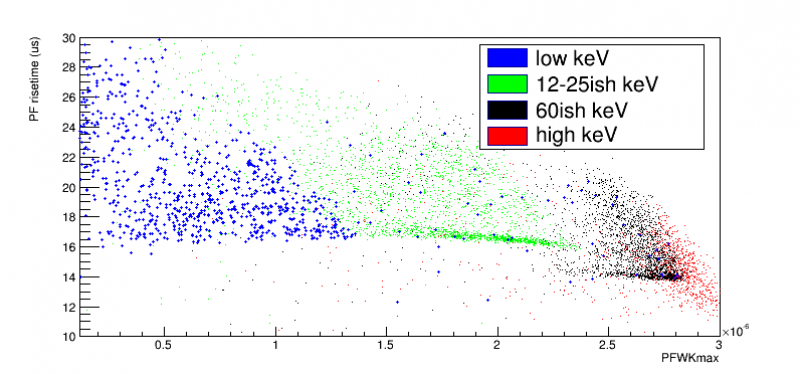
Why is there a high density band in 60keV area and the 12-25keV area? Is this structure from Am? Or is it from some other source? What would 0 volt data look like?
I am now trying to discern whether or not these higher density points correspond to the peaks. First looking at 60keV, I created a figure which plots the same range, one including the 60keV peak (rightmost plot) and one that excludes that peak (leftmost).
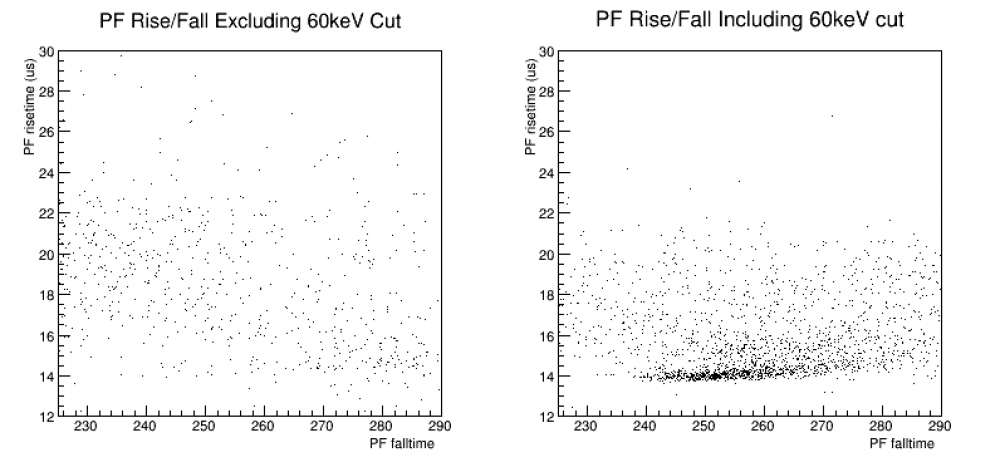 As you can see, the high density points with a consistent risetime and spread in falltime disappear almost entirely when you exclude the peak which give me higher confidence that these points are in fact due to Am. I am now going to redo this analysis on 0V data to see if it persists and exactly how does it change. You can find that analysis Here
I was unable to find the Am peaks in the original zero-volt SI data, I have swapped to some two sided data where I do have some pulses, those can be found Here Energy Spread for the 2-sided data Here
A summary page is posted here. Summary
More zero volt analysis can be found here: more zero volt