2017/11/21 (Tuesday)
| Setup: DIB1/3/4 → SL 27/19/20 → 3.2 MHz filters → cables 2,1,3 → HV board inputs 1,3,2 → HV board outputs 1,2 → DCRC55(1)/50(3). | |
| 1000 | Tower/MC/Coldplate = 26.5/26.7(?)/153 mK, Still = 1.26 K / 0.110 mbar, G1/G2 = 167/156 mbar, 1K Pot = 1.65 K / 34 mbar, MB = 26.6% |
| Realize that for the IbIs taken over the weekend, all the front-end gains were left at 1. So some of them have SQUID jumps, and we know that low front-end gain produces errors in IbIs. | |
| 1010 | Begin adjusting front-end gains for each channel. Set as high as we can without overwhelming high-frequency noise. |
| 1020 | Set all front-end gains to 15. This introduces sharp peaks at around 350 and 400 kHz in the PSDs. |
| 1022 | Start LHe transfer (MB = 26.7%) |
 |  |  |
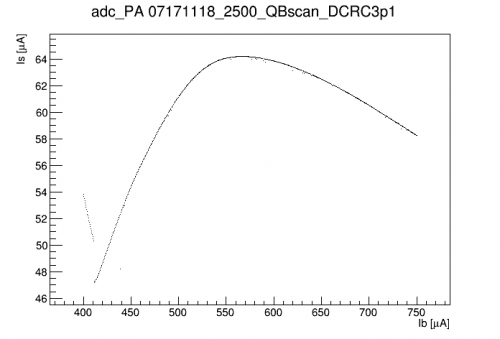 | 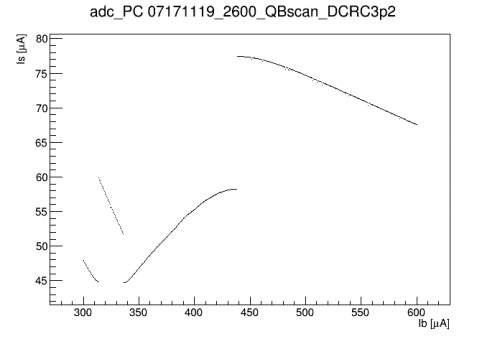 | 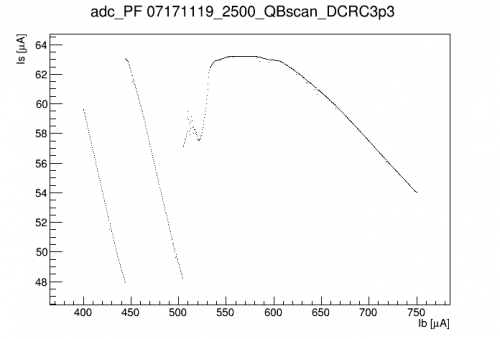 |
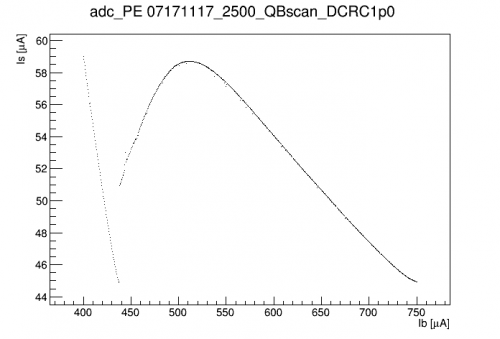
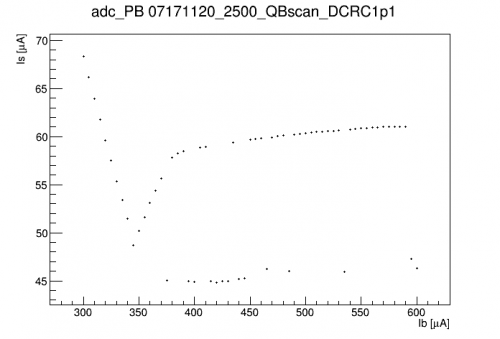
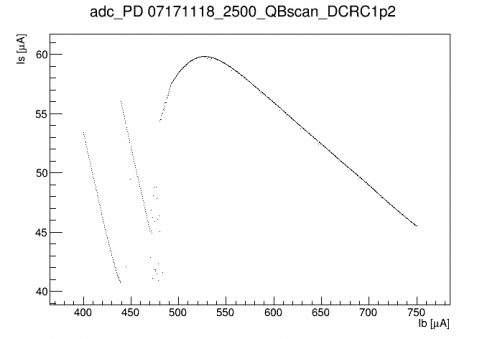
Above are the best IbIs curves so far (all with front-end gain = 0). DCRC1p1, the one with the strong oscillations, has odd behavior in the normal regime - it sorta looks like it can't actually be driven normal. DCRC1p2 and DCRC3p3 have some anomalous points near the bottom of the transition. DCRC1p1 also has anomalous points. It seems to be the case that it is sometimes falls into a low state for a single trace - strange. A few channels show SQUID jumps - redoing these with higher front-end gains should improve them.
| 1120 | Perform a quick manual IbIs on DCRC3pD, now with front-end gain = 15. It is better behaved than the one shown above. Maximum around 560 uA, a region of strong oscillations around 515-525 uA, then s/c falloff around 460 uA. Very different than the one shown above. Maybe there are some problems with the IbIs algorithm, or maybe it works better with higher front-end gain. |
|---|---|
| 1124 | End LHe transfer (MB = 77.9%) |
| 1153 | Fill LN2 cold trap full. |
| 1235 | Reset QET biases: DCRC1pA/B/C = 480, 370, 510 uA DCRC3pB/C/D = 470, 380, 500 uA |
| 1235 | Also adjust driver offsets so that they should be in a good place for IbIs. |
| 1250 | Begin IbIs data sequence on DCRC1pA with HV=0V from 650 to 400 uA in -0.5 uA steps, 3 seconds of data per step. (IbIsDCRC1pA.msl) |
| sequence continued to completion, no problems. | |
| 1343 | Remote HV work: Start webcamAutomater on jiajin. This will take an image of the HV bias and leakage measurements every 5 minutes and update the K100 monitoring page. |
| 1650 | Remote HV work: Install relay on HV power supply mains plug. Relay is controlled by DCRC4QO bias. HV supply will be powered off unless DCRC4QO bias >= 2V. |
| 1653 | Remote HV work: Power on HV power supply. With HV control cable disconnected and HV disconnected from detector HV board, set HV = 100.00 V. Now, turn off HV supply by setting DCRC4QO bias = 0. Connect HV control cable to DCRC4 adapter board BNC terminal. Set DCRC4QI = 10.801 V, this is the setting for HV ~ 0V. Turn on HV power by setting DCRC4QO = 2 V. HV settles at -0.17 V. Trying a few other settings, it seems the desired functionality is there, but the calibration of DCRC4QI to HV out has changed slightly. Hopefully it will be stable in this new configuration. |
| 1704 | Leave DCRC4QI=10.801 V. Turn off HV power by setting DCRC4QO = 0 V. Plug HV bias cable into detector HV board. Stop programs and disable DCRC4 in ODB. Now we should be back to the earlier state for 0V IbIs. |
| 1707 | We should now be able to turn on the HV supply and set a bias remotely using DCRC4QI and QO. The basic instructions for doing so are below. |
Remote HV Instructions
The QI bias (Bias (V)[0] in the ODB) scales the HV power supply output down from it's maximum setting. If the HV supply is set to 100V, the min/max settings are roughly: Bias (V)[0] = 10.801 ~ HV=0 V, and Bias (V)[0] = 0 ~ HV=100 V. The QO bias (Bias (V)[1] in the ODB) controls a relay which provides power to the HV supply. A setting of DCRC4/Charge/Bias (V)[1] = 0 will leave the relay open and the power supply off. Changing this to DCRC4/Charge/Bias (V)[1] = 2 will energize the relay, powering the HV supply. To use the HV supply remotely, follow these steps.
- Stop any runs and disable all DCRC programs in MIDAS (triggerfe2, towerfe3_01, and dcrc_driver01)
- Enable DCRC4 in ODB. Make sure it is set as a timing slave and has DCRC4/Charge/Bias (V)[0] = 10.801 as well as DCRC4/Charge/Bias (V)[1] = 0.
- Start the dcrc programs. To turn on the HV supply, set DCRC4/Charge/Bias (V)[1] = 2. This will power the HV supply, but the DCRC scaling voltage should keep the HV ~ 0 V. Check the power supply webcam on the K100 monitoring page to make sure nothing stupid has happened.
- Now you can control the HV bias from 0→100 V by changing DCRC4QI from 10.801→0 V. Important:The HV supply will respond quickly to any change in bias you set. So try to change the voltage slowly! Changing DCRC4QI at 0.1 V/s will change the HV by 1 V/s which is about what we do by hand. |
- To stop using the remote HV control, first (slowly) reduce to HV = 0 V. Then, power off the HV supply by setting DCRC4/Charge/Bias (V)[1] = 0. If you don't need DCRC4 for anything else, you can then stop the dcrc programs and disable it in the ODB. |
| 1716 | Fill LN2 cold trap full. |
|---|---|
| 1731 | Begin IbIs data sequence on DCRC1pB with HV=0V from 600 to 300 uA in -0.5 uA steps, 3 seconds of data per step. (IbIsDCRC1pB.msl) |
| sequence continued to completion. BUT, the files are very small, they seem to include no data… | |
| 2137 | Begin IbIs data sequence on DCRC1pC with HV=0V from 650 to 400 uA in -0.5 uA steps, 3 seconds of data per step. (IbIsDCRC1pC.msl) |
| DAQ froze, sequence did not complete. Last file was at 22:34, 506.0 uA. Also the files are very small, they seem to include no data… |