Table of Contents
Integral / OF agreement cut
This cut requires that the integral amplitude and the OF amplitude of the total pulse track with one another. This cuts out a lot of bad pulses. For example, if there is pileup, the integral will essentially get the sum of the two pulses, but the OF algorithm only catches the first one. So there will be a mismatch. This cut will get rid of a lot of pileup and also likely other misshapen pulses.
Example: simple flat cut
We start with loading some calibration data (SiHV-triggered) and loading the correction & calibration
gStyle->SetOptStat(0)
gStyle->SetOptFit(1)
TString datapath ="/data/chocula/fritts/data/k100proc/midasrq/byseries/"
TString ser[] = {"07220827_1153","07220916_2059","07220917_1039","07220917_2125"}
//TString lab[] = {"0V","-4V","-21V","-65V","-84V","-84V"}
int nser = 4
TChain *e[10]
TChain *z[10]
for(int s=0;s<nser;s++)e[s] = new TChain("rqDir/eventTree")
for(int s=0;s<nser;s++)z[s] = new TChain("rqDir/zip1")
for(int s=0;s<nser;s++)e[s]->Add(Form("%s/%s/umn*root",datapath.Data(),ser[s].Data()));
for(int s=0;s<nser;s++)z[s]->Add(Form("%s/%s/umn*root",datapath.Data(),ser[s].Data()));
for(int s=0;s<nser;s++)z[s]->AddFriend(e[s])
//z->SetLineColor(kRed)
TCut crand = "EventCategory"
for(int s=0;s<nser;s++)z[s]->SetAlias("PTwid","(PTWKf40-PTWKr40)*1e6")
for(int s=0;s<nser;s++)z[s]->SetAlias("xdel","1e6*(PEWKr20-0.5*(PCWKr20+PDWKr20))-1")
for(int s=0;s<nser;s++)z[s]->SetAlias("ydel","1e6*(0.866*(PDWKr20-PCWKr20))+9")
// note empirical offsets in xdel, ydel
for(int s=0;s<nser;s++)z[s]->SetAlias("phidel","180./3.14159*atan2(ydel,xdel)")
for(int s=0;s<nser;s++)z[s]->SetAlias("afdel","1e6*(PFWKr20-PAWKr20)")
//
TCut cgoodwalk = "PCWKr20>0.25e-3&&PCWKr20<0.5e-3&&PDWKr20>0.25e-3&&PDWKr20<0.5e-3&&PEWKr20>0.25e-3&&PEWKr20<0.5e-3"
for(int s=1;s<4;s++)z[s]->SetAlias("pt_keV","7.738820e+07*PTOFamps+1.653756e+13*PTOFamps**2")
for(int s=1;s<4;s++)z[s]->SetAlias("pt0_keV","7.738820e+07*PTOFamps0+1.653756e+13*PTOFamps0**2")
for(int s=1;s<4;s++)z[s]->SetAlias("PSUMbs","PAbs+PBbs+PCbs+PDbs+PEbs+PFbs")
for(int s=1;s<4;s++)z[s]->SetAlias("BSel","PSUMbs-18400")
for(int s=1;s<4;s++)z[s]->SetAlias("pt_keV_bscorr","pt_keV/(1.-0.0461538*BSel/165)")
for(int s=1;s<4;s++)z[s]->SetAlias("pt0_keV_bscorr","pt0_keV/(1.-0.0461538*BSel/165)")
TCut cbs = "BSel<1100"
for(int s=1;s<4;s++)z[s]->SetAlias("pt_keVee","14.0821*pt_keV_bscorr/(333.899-pt_keV_bscorr)")
for(int s=1;s<4;s++)z[s]->SetAlias("pt0_keVee","14.0821*pt0_keV_bscorr/(333.899-pt0_keV_bscorr)")
The integral value is distorted if the pulse is on a downward sloping baseline. We want to include some downward-sloping baselines. Nick developed a way to correct the integral for the slope of the baseline. This corrected integral is a better one to use for this cut.
// make a int/of agreement cut
// with a correction like Nick's for Run68: correct PTINTall for slopes.
for(int s=1;s<=3;s++)z[s]->SetAlias("PTdbs","(PAbspost-PAbs) + (PBbspost-PBbs) + (PCbspost-PCbs) + (PDbspost-PDbs) + (PEbspost-PEbs) + (PFbspost-PFbs)")
for(int s=1;s<=3;s++)z[s]->SetAlias("PTINTall_PTdbscorr", "PTINTall-(PTdbs<0)*0.5*(PTdbs*4096./PFnorm)")
//
z[1]->Draw("PTINTall_PTdbscorr/PTOFamps:pt_keVee>>h1ofint(300,0,5,200,-1000,2000)",!crand+cbs,"colz")
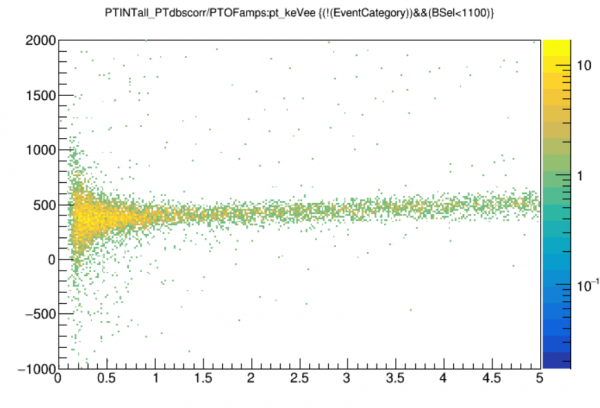
Here we have shown the ratio of integral to OF for a region of interest, 0-5 keVee. (actually ROI is probably 0-1 keVee). The ratio forms a band; the cut is meant to remove outliers from the band.
We could make a cut that tracks the shape of the band. As a first pass I will just set limits, which should encompass most of the wide part at low energy. I define a “tight” cut and a “loose” cut.
TCut cofintl = "PTINTall_PTdbscorr/PTOFamps>50&&PTINTall_PTdbscorr/PTOFamps<750"
TCut cofintt = "PTINTall_PTdbscorr/PTOFamps>250&&PTINTall_PTdbscorr/PTOFamps<550"
I only did this for one calibration series but I checked to make sure it works for the other two.
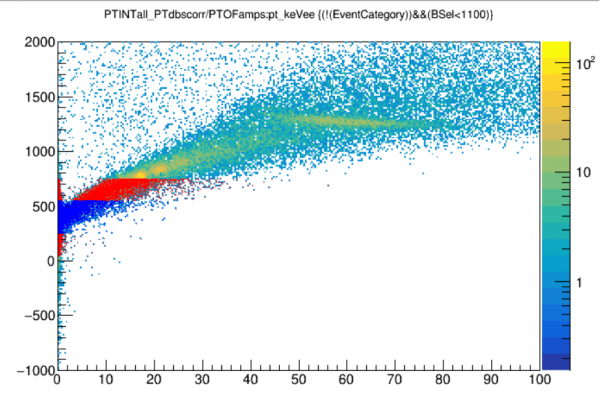
Note that these cuts don't work at high energies. We may want to look more at high energies to better understand the coincident spectrum, or for other reasons. If so we'd want to not use these cuts, and if we want a pileup cut we need to make a new one that follows the trend.
The figure below show the integral/OF ratio to higher energies. Because of pulse widening the ratio drifts upward (the OF template becomes an increasingly poorer fit). The colored regions show what events are retained by the two cuts.
Cut efficiency
We can treat the efficiency of this cut in two parts. First, we can ask how many of the events that are clearly in the good distribution seen in the figure actually pass the cut. So we can create a very loose version of the cut that captures everything.
NOTE: it is clear that the efficiency will be highly energy-dependent. A better cut would follow the shape of the band to remove the energy dependence.
// int/of cut efficency
// note - efficiency of this simple cut is very energy dependent
// should do a cut that follows the band and removes the dependence
z[1]->Draw("pt_keVee>>hgood(50,0,5)",!crand+cbs+cofintvl)
z[1]->Draw("pt_keVee>>heff(50,0,5)",!crand+cbs+cofintt)
heff->SetTitle("OF/INT agreement cut efficiency;energy [keVee];efficiency")
heff->Draw()
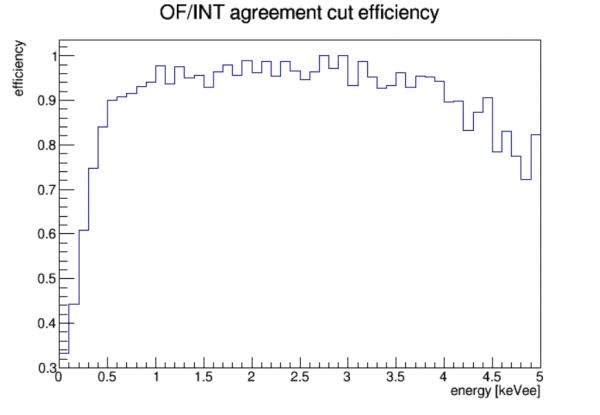
We can look at the efficiency in a low-energy region of interest:
// lets look at the efficiency for a realistic ROI
float ngood = z[1]->GetEntries(!crand+cbs+cofintvl+"pt_keVee>0.035&&pt_keVee<0.5")
root [57] float npass = z[1]->GetEntries(!crand+cbs+cofintt+"pt_keVee>0.035&&pt_keVee<0.5")
root [58] npass/ngood
// (float) 0.660580f
We find 66.1% for this version of the cut
The second part of the efficiency relates to the fact that this cut removes pileup. A good event could be ruined by another event appearing in its trace window. Most of those events will be far outliers in the plot above. So we haven't captured those events in the efficiency calculation.
We can calculate an event rate seen in the SiHV detector and along with the trace window length we can calculate the fraction of events with pileup.
Example: improved curved cut
This time we'll load the three calibration series from the 2022 Sep 16-17 period into one TTree, to improve stats. We also apply the energy calibration:
// load all calibration series into one chain
gStyle->SetOptStat(0)
gStyle->SetOptFit(1)
TString datapath ="/data/chocula/fritts/data/k100proc/midasrq/byseries/"
TString ser[] = {"07220916_2059","07220916_2200","07220917_1039","07220917_1225","07220917_2125","07220917_2155"}
//TString lab[] = {"0V","-4V","-21V","-65V","-84V","-84V"}
int nser = 6
TChain *e
TChain *z
e = new TChain("rqDir/eventTree")
z = new TChain("rqDir/zip1")
z4 = new TChain("rqDir/zip4")
// load even-numbered series only, those are the calibration series
for(int s=0;s<nser;s++)if(s%2==0)e->Add(Form("%s/%s/umn*root",datapath.Data(),ser[s].Data()));
for(int s=0;s<nser;s++)if(s%2==0)z->Add(Form("%s/%s/umn*root",datapath.Data(),ser[s].Data()));
for(int s=0;s<nser;s++)if(s%2==0)z4->Add(Form("%s/%s/umn*root",datapath.Data(),ser[s].Data()));
z->AddFriend(e)
z->AddFriend(z4)
//z->SetLineColor(kRed)
TCut crand = "EventCategory"
z->SetAlias("pt_keV","7.738820e+07*PTOFamps+1.653756e+13*PTOFamps**2")
z->SetAlias("pt0_keV","7.738820e+07*PTOFamps0+1.653756e+13*PTOFamps0**2")
z->SetAlias("PSUMbs","PAbs+PBbs+PCbs+PDbs+PEbs+PFbs")
z->SetAlias("BSel","PSUMbs-18400")
z->SetAlias("pt_keV_bscorr","pt_keV/(1.-0.0461538*BSel/165)")
z->SetAlias("pt0_keV_bscorr","pt0_keV/(1.-0.0461538*BSel/165)")
TCut cbs = "BSel<1100"
z->SetAlias("pt_keVee","14.0821*pt_keV_bscorr/(333.899-pt_keV_bscorr)")
z->SetAlias("pt0_keVee","14.0821*pt0_keV_bscorr/(333.899-pt0_keV_bscorr)")
We again do the correction of the integral quantity, then draw the INT/OF ratio versus energy from 0-5 keVee:
// correction like Nick's for Run68: correct PTINTall for slopes.
z->SetAlias("PTdbs","(PAbspost-PAbs) + (PBbspost-PBbs) + (PCbspost-PCbs) + (PDbspost-PDbs) + (PEbspost-PEbs) + (PFbspost-PFbs)")
z->SetAlias("PTINTall_PTdbscorr", "PTINTall-(PTdbs<0)*0.5*(PTdbs*4096./PFnorm)")
//
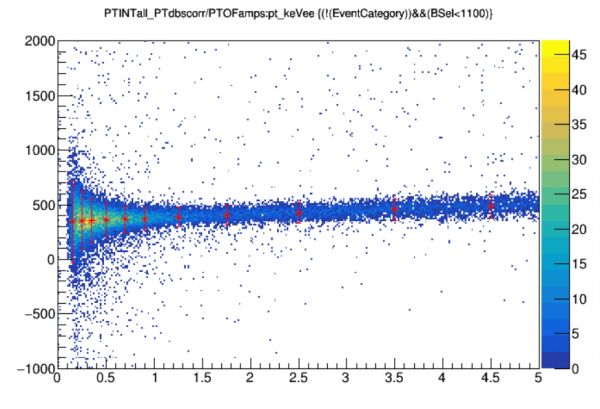
z->Draw("PTINTall_PTdbscorr/PTOFamps:pt_keVee>>hofint(300,0,5,200,-1000,2000)",!crand+cbs,"colz")
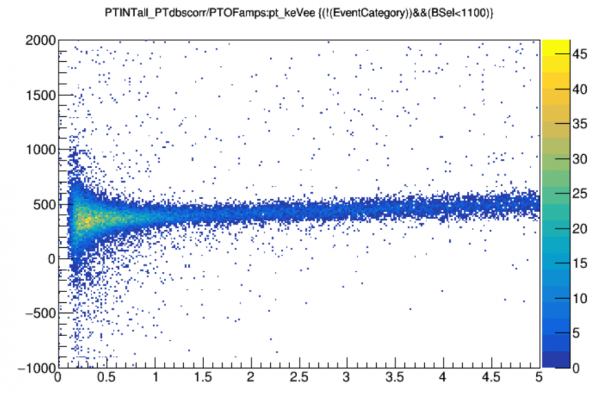
We want to divide the above plot into vertical slices, then make a Gaussian fit of each slice to define a band. We'll define edges for the slices: narrower at low energies where the width is changing quickly, wider at high energies.
float edges[12] = {0.1,0.2,0.3,0.4,0.6,0.8,1,1.5,2,3,4,5}
TH1F* hslice[11]
for(int s=0;s<11;s++)hslice[s]=new TH1F(Form("hslice%d",s),"",100,-500,1200)
for(int s=0;s<11;s++)z->Draw(Form("PTINTall_PTdbscorr/PTOFamps>>hslice%d",s),!crand+cbs+Form("pt_keVee>%f&&pt_keVee<%f",edges[s],edges[s+1]))
for(int s=0;s<11;s++)hslice[s]->Fit("gaus")
Here's an example of a slice for 200-300 eVee:
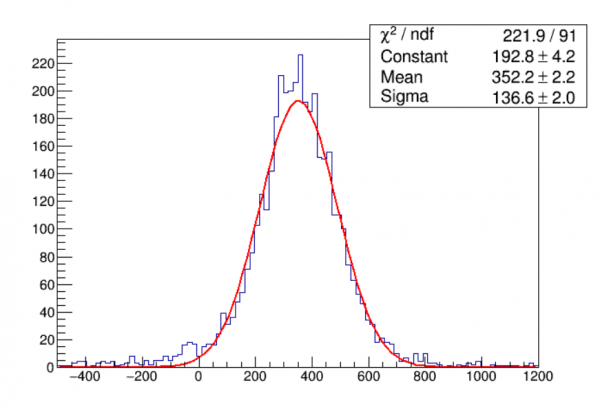
We can superimpose the results of the fits onto the data to see if the fits look right. I use the center of the energy band to define the energy of the slice. Here I draw the width out to ±1.96 sigma, which for a good Gaussian would include 95% of the data.
TGraphErrors gctre
for(int s=0;s<11;s++)gctre.SetPoint(s,0.5*(edges[s]+edges[s+1]),hslice[s]->GetFunction("gaus")->GetParameter(1))
for(int s=0;s<11;s++)gctre.SetPointError(s,0,1.96*hslice[s]->GetFunction("gaus")->GetParameter(2))
gctre.SetLineColor(kRed);gctre.SetMarkerColor(kRed)
hofint->Draw("colz");gctre.Draw("*");
Now we make two graphs: one for the width (sigma) from the Gaussian fit for each slice, and one for the center. We plot these versus energy.
TGraph gctr, gsig;
for(int s=0;s<11;s++)gctr.SetPoint(s,0.5*(edges[s]+edges[s+1]),hslice[s]->GetFunction("gaus")->GetParameter(1))
for(int s=0;s<11;s++)gsig.SetPoint(s,0.5*(edges[s]+edges[s+1]),hslice[s]->GetFunction("gaus")->GetParameter(2))
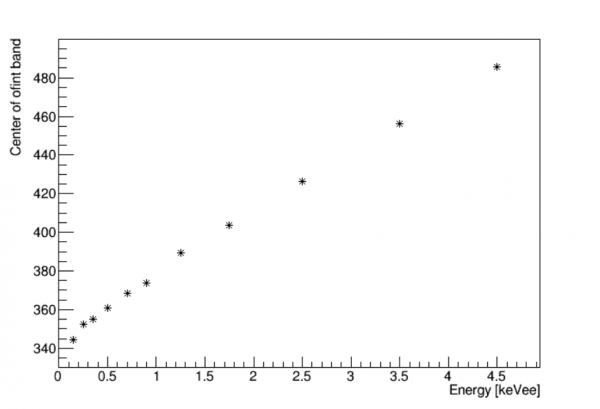 | 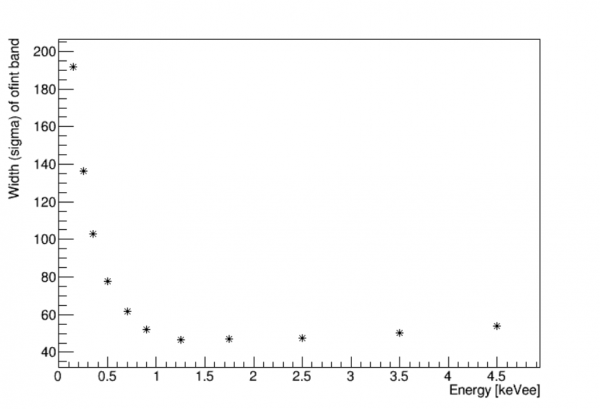 |
We want to use these curves to define the band and set a cut. In Root the most convenient way to do this is to fit each curve to a function. For the width this is a sort of complicated function. We just need something that fits. I chose to do three different fits: exponential for points 0,1,2; quadratic for points 2,3,4,5,8 (points 6 and 7 seemed like outliers so I skipped them); quadratic for points 8,9,10. I found where the first and second functions intersect and where the second and third functions intersect. I used those intersections to define boundaries for a piecewise-defined function.
The center graph is much simpler. It could just be fit to a line. I chose instead to use a quadratic that works out to 20keVee instead of the 5keVee max I plotted. As it turns out the resulting cut will be inclusive for higher energies. The width function flares out so that it's no longer good at removing bad events at high energies. If we want we can define a different cut for high energies.
Below is the code for defining the cut. I define the band for ±1.96 sigma, targeting 95% efficiency.
z->SetAlias("ofint_sig","(pt_keVee<0.3661)*(302.84*exp(-3.108*pt_keVee))+(pt_keVee>=0.3661&&pt_keVee<0.9452)*(42.044*pt_keVee**2-143.59*pt_keVee+144)+(pt_keVee>=0.9452)*(0.5817*pt_keVee**2-0.833*pt_keVee+46.109)")
z->SetAlias("ofint_ctr","343.7+34.18*pt_keVee-0.5833*pt_keVee**2")
// note: above has been adjusted to fit out to pt_keVee=20
// although sigma is only good out to 5 keVee
TCut cofintc = "PTINTall_PTdbscorr/PTOFamps>ofint_ctr-1.96*ofint_sig&&PTINTall_PTdbscorr/PTOFamps<ofint_ctr+1.96*ofint_sig"
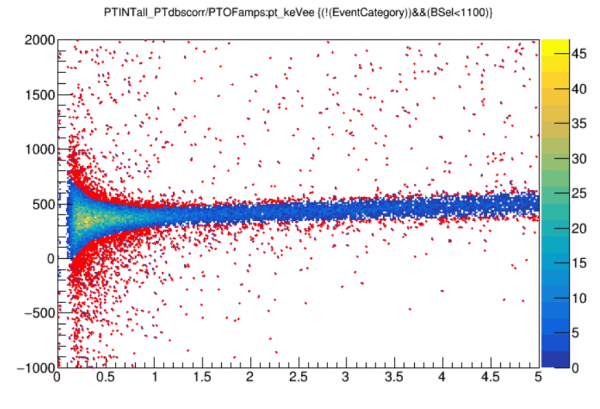
Below is a final check that the cut works properly. The red points are events that fail the cut.
hofint->Draw("colz")
z->SetMarkerColor(kRed)
z->Draw("PTINTall_PTdbscorr/PTOFamps:pt_keVee",!crand+cbs+!cofintc,"same")
Now let's check the cut efficiency. As before in the simple linear cut I calculate the efficiency as the number of events in a very loose, wide band that pass the cut.
// int/of cut efficency
// efficiency of this improved cut has low energy dependence
// should do a cut that follows the band and removes the dependence
TCut cofintvl = "PTINTall_PTdbscorr/PTOFamps>-700&&PTINTall_PTdbscorr/PTOFamps<1500"
z->Draw("pt_keVee>>htotal(50,0,5)",!crand+cbs+cofintvl)
z->Draw("pt_keVee>>hpass(50,0,5)",!crand+cbs+cofintvl+cofintc)
TGraphAsymmErrors* geff = new TGraphAsymmErrors()
geff->Divide(hpass,htotal)
geff->SetTitle("OF/INT agreement cut efficiency;energy [keVee];efficiency")
geff->Draw("a*")
// lets look at the efficiency for a realistic ROI
float ngood = z->GetEntries(!crand+cbs+cofintvl+"pt_keVee>0.035&&pt_keVee<0.5")
float npass = z->GetEntries(!crand+cbs+cofintc+"pt_keVee>0.035&&pt_keVee<0.5")
npass/ngood
// (float) 0.900912
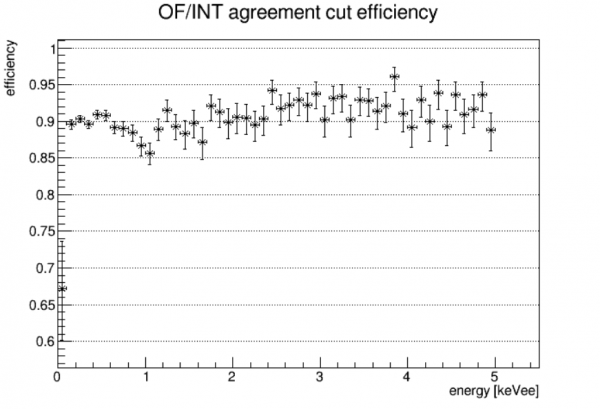
The efficiency is relatively flat with energy. It's a bit lower than the 95% target, surely because the slices aren't perfect Gaussians. For an expected signal region (below 500 eVee) the efficiency is 90.1%.
Chisquare cut
It's often useful to cut away events with high chisquare from the optim