−Table of Contents
Data Analysis
Notes
When doing Gaussian fits to the data, we have decided (as of 6/28/2018) to use fit→GetParError(par) as the error on the mean of the fit.
Procedure
After collecting a data file filled with waveforms, this needs to be reduced to a manageable size. This is done using my "waveform_reduction.cxx" program. This takes waveforms, plots them to visualize, and reduces them to pulse amplitude or pulse area.
The code produces amplitudes in units of Volts and pulse areas in units of nVs for all DAQs.
| For PMTs | For SiPMs (short waveforms) | For SiPMs (long waveforms) | For NI 5133 DAQ | |
|---|---|---|---|---|
| dataSize | usually 200, depends on timebase used on scope | usually 200, depends on TB4 file | 1024 | usually 500 |
| meridiemCheck | 0 | 0 if AM/PM not present in data file time stamp, 1 if they are present in time stamp | 0 if AM/PM not present in data file time stamp, 1 if they are present in time stamp | 0 |
| chanTot | depends, 1-4 | 4 | 4 | 2 |
| daqType | Lecroy | TB4 | TB4 | NI5133 |
| baseSubtrMethod | firstBins | firstBins or fixed | gauss or sometimes landau | firstBins or mostProb |
| baselineRange | {0,80} | {0,80} | {0,1024} | |
| pulseRange | {100,200} | {100,200} | {0,1024} | |
| integMethod | 1 | 1 | 1 | 1 |
| integType | fullRange | fullRange | fullRange | fullRange |
To compile on Macs: clang++ waveform_reduction.cxx (root-config –glibs –cflags) -o plastScintRed
To run and see waveforms: ./plastScintRed <File_Name>
To run and not see waveforms: ./plastScintRed <File_Name> -b
Need to change lines 43 and 44 to:
#include “/data/zlatibor/cdms/poehlmann/data_analysis/DMstyle.h”
#include “/data/zlatibor/cdms/poehlmann/data_analysis/calculateMode.h”
To stop on each waveform and require “Enter” to continue, cinGet = 1. Set “getEvNum” to the desired waveform number to start requiring enter there.
Turn “printChannels” to 1 to save waveforms. Set randNum to save waveforms ending in the that number (every 1000).
Set “runTrue” = 1 to end the program on the waveform of “getEvNum” so you can use the ROOT features like Fit Panel, etc.
Analysis in Root
To do subsequent analysis, a macro must be written. A sample is shown below.
| Sample Macro |
|---|
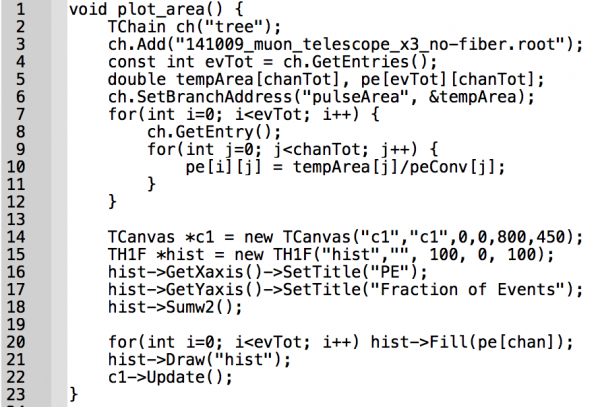 |
To run: root “macro_name.C”
If there are input arguments: root “macro_name.C(arg1,arg2,arg3)”
PMT PE calibration (see my thesis)
To find the pulse area that corresponds to 1 PE, fit a gaussian to the pulse area of one of the following files:
| PMT Bias | Data File | My determined conversion from nVs to PE |
|---|---|---|
SiPM PE calibration (see my thesis)
| Alex SiPM Name | DMP SiPM Name | Data File | My calculation of nVs to PE conversion |
|---|---|---|---|
| 1 | |||
| 2 | |||
| 3 | |||
| 4 |