−Table of Contents
TB4 Procedure and Notes
Notes before starting
In the folder TB4_SETUP_v321 on the Desktop, the is a file called “TB4 quick start guide.pdf”. Read this.
Channel 3 does not work. SiPM D also does not work.
The board can be quite touchy. Make sure to turn off board power when board is not in use otherwise channel 2 stops working temporarily.
Before entering dark room, the TB4 board must be turned off otherwise a bias will still be applied to the SiPMs.
Setting up the board
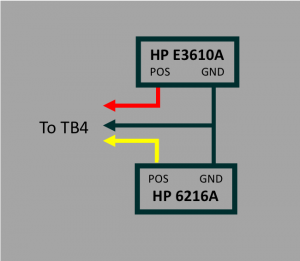
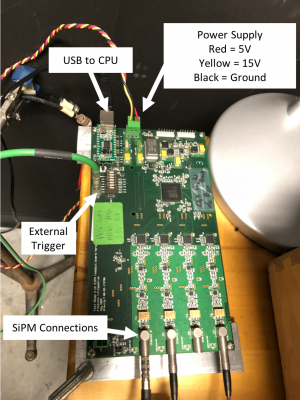
| TB4 Power Supply | TB4 Board |
|---|---|
 |  |
Running the TB4 program
- Turn on both the 5V (HP E3610A) and 15V (HP 6216A) power supplies.
- In the folder TB4_SETUP_v321 on the Desktop, right click on “setup.exe” and select “Run As Administrator” and hit “Yes” and then “Okay”. Hit “List Devices” and then “Select.