IbIs Measurements
Once you’ve tuned the SQUIDs, you are ready to take IbIs measurements. These measurements will help you identify the transition region for each phonon channel. Additionally, you will be able to determine the QET bias value that you wish to set for each channel. This IbIs measurement involves the tracking of the signal baseline as the QET bias is varied. Lastly, especially if this is a new detector being tested, the parasitic and normal resistances are of interest to CDMS detector group.
- Ensure that the SQUIDs have been tuned and locked. You can refresh your memory in the “Zap SQUIDs and SQUID Tuning” appendix.
- Ensure the timing link is set up.
- Go to the detector control vi. Set the QET bias to 0 uA.
- Pull up the detector readout vi and switch to the responsivity window for the channel. For the trace length, you should use either 16.384 ms or 3.2768 ms, with a lookback time of 400 or 100 uS, respectively. 3.2768 ms should be fine, though.
- Open an excel spreadsheet. Create 1 sheet per phonon channel (so, create 12 sheets if all three dibs are being used) within the document. Label each sheet with the phonon channel, dib and DCRC board being used.
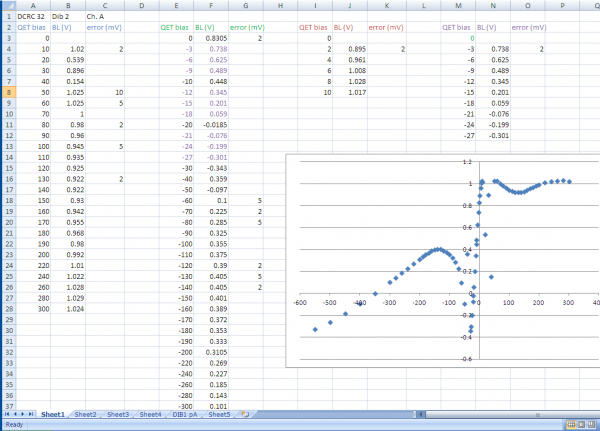
- See Figure J.1. Note how there are three adjacent columns that repeat: QET bias, BL (which refers to baseline) and error, and that these columns repeat. Create in the spreadsheet these three column titles and repeat them 3-4 times as well.
- To acquire a thorough IbIs data set, you are first going to do a QET bias sweep. Thus, you are going to take data points in steps of:
- 10 uA from 0 to 200 uA
- 20 uA from 200 to 300 uA
- 50 uA from 300 to 500 uA
- 100 uA from 500 to 1000 uA
- In the excel spreadsheet, list these bias steps under the QET bias column, as seen in Figure 1.
- Go to the next set of three columns and list the same set of steps as the step above, but now make the values in the QET bias column negative in magnitude.
- Begin taking data by recording the value of the signal baseline for the phonon channel at 0 uA. Depending on how much the baseline value jumps, you will have an error value, which you will place in the error column on the spreadsheet.
- Take data in the pre-determined steps listed in the spreadsheet. First take data for negative QET bias values. Once you finish, set the QET bias back to 0 uA and re-lock the squid. Then start from 0 uA (making sure you get the same value as last time) and take all desired data points.
- Once you have finished doing this first bias sweep, plot all of the points on a graph. The x-axis should be QET bias and the y-axis should be the baseline in volts. An example of what the plot should look like is in Fig. J.1. Note the linear trend in the center of the plot. This is the superconducting region. Theoretically the resistance of our sensors should be zero. However, this is impossible - there is always some parasitic resistance in the sensors and it is your goal to determine this from the slope of the linear trend. However, you must have enough data points to do this accurately (next step). The normal resistance of this sensor can also be determine from the tail of the plot trend. If you fit a line to the tail past -200 uA (for example), you will be to extract this information.
- Set the QET bias back to 0 uA. Re-lock the SQUID. Now that you know the range of the superconducting region, you are going to go in steps of 2-3 uA in the positive and negative direction from 0 uA. When you finish taking this data, re-plot your figure with the entirety of data points that you took. At this point you should be able to fit a line to the central linear region to extract the parasitic resistance information.
Note:
- Never directly transition from the negative values to the positive values when taking data points (or vice versa). Instead, before switching, set the QET bias back to 0 uA. Then re-lock the SQUID and check what the baseline value is at 0 V. You should always read the same value for 0 uA (within error). This is your reference value. If it’s not the same, re-lock the SQUID to see if that gives what you expect.
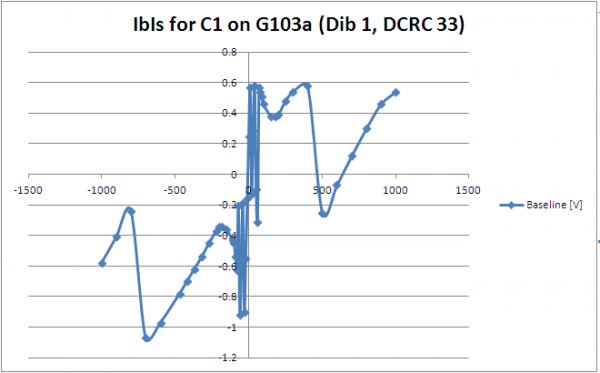
- Sometimes the SQUID ‘jumps’. What this results in is a large change in the baseline value. This is to be expected (see Figure 2). Continue taking data points.
| Figure 1: An example of an IbIs spreadsheet with a plot of the QET bias (uA) vs. Baseline (V) |
|---|
 |
| Figure 2: An example of an IbIs plot of the QET bias (uA) vs. Baseline (V) with several SQUID jumps |
|---|
 |