Remote HV Setup
We have constructed a circuit to use a DCRC to remotely control a power supply in order to automatically control HV detector biases. The circuit consists of a power supply, DCRC, DCRC adapter board, and relay circuit. The DCRC controls the relay to turn on/off mains voltage to the power supply and controls the power supply bias setting. Both of these are accomplished by setting the DCRC charge channel bias voltages. This allows us to control the HV bias voltage from the MIDAS DAQ.
Circuit
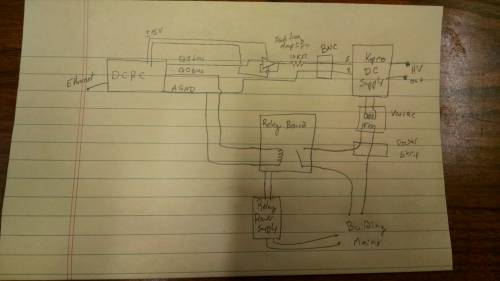 |
| A (crude) schematic of the circuit |
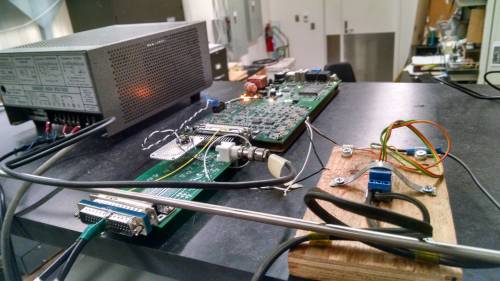 |
| The components layed out and connected in practice |
Setup Procedure
- Start with the DCRC off and with the power supply turned all the way down and switched off.
- There is a power strip connected to the relay board. Plug this power strip into the ground-isolating cheater cord and plug that cord into the building instrument mains (orange outlet)
- The relay board also has a small power supply which looks like/was a phone charger. Plug this into the mains as well.
- Plug the Variac into the power strip and plug the Kepco 1kV power supply into the Variac.
- The DCRC adapter board plugs into DCRC2. There are also two wires which need to be soldered from DCRC2s 15V power supply to the isolation amplifier on the DCRC adapter board.
- The Kepco power supply has a BNC cable connected to the back. This is used to vary the bias voltage. Connect this cable to the BNC jack on the DCRC adapter board.
- Make sure the Kepco power supply control knob is turned all the way down. Switch the power supply power switch on (up). Nothing should happen yet as the relay needs to be activated to power the supply.
Operating Procedure
Everything should be ready to go now. DCRC2 controls two parts of the power supply circuit. The QO bias voltage controls the relay board which gives power to the HV supply. Setting DCRC4 QO bias to ~2V should activate the relay and power the supply. DCRC2 QI scales the bias voltage down from the maximum bias supply setting. Setting QI to 0V will cause the power supply to output it's maximum voltage setting. Setting QI=~10.76 V will cause the power supply to output ~0V. Because this whole system is not error-proof, it is important to be mindful of what settings DCRC4 has in order to not switch suddenly between high and low voltages.
After following the Setup instructions above, do the following to setup and operate the system.
First Time
- Before powering the DCRC or starting any MIDAS programs, check the DCRC2 settings in the ODB. Make sure DCRC2 is enabled, the 15V power is enabled and that DCRC2 Q[0]/Q[1] = 10.76/0 V.
- Make sure the power supply is switched ON, but the knob is turned all the way down. Plug the HV output voltage into a voltmeter. DO NOT have it plugged into the detector for this setup.
- Power DCRCs and start the MIDAS programs. Nothing should happen yet.
- Set DCRC2Q[1]=2 V. This should switch on the power supply, but the output should still be ~0V.
- We'll now set the HV max output using a known setting. We'll use a control voltage of 0V at output voltage of 100V. Set DCRC2Q[0]=0V. Then, turn up the HV supply knob until the HV output voltage is 100V. Now the knob is in the right place for our calibration. You can use any other known pair of biases for this, but 0V,100V is a good standard.
- Turn DCRC2Q[0] up slowly to 10.76V. This should decrease the HV output voltage to ~0V. With these settings, the voltage steps are multiplied by ~10, so only change DCRC2Q[0] by ~0.1-0.5 V at a time to turn the bias down smoothly.
- Now the system should be ready to operate as normal
Subsequent Times
- Use DCRC2Q[1]=0/2 V to turn the power supply off/on
- Use the range DCRC2Q[0]=10.76-0 V to set HV bias from 0-100 V. Note that the control voltage scales the HV voltage down.
- Always make sure that DCRC2Q[0]=10.76 (i.e. HV voltage=0) before turning the supply on/off
- Always change the control voltage slowly
Sequences
It can be tedious to manually slew the control voltage up and down. Several MIDAS sequences have been written to automate this. Unfortunately, a unique sequence is needed for each bias voltage, so there may be many of them. There have also been sequences written to take data with automatic bias changes (including prebiasing) and flashing etc.
To make new such sequences, there are two python scripts that can be used. They are located in /home/hep/cdmssoft/scdmsDAQ/MidasDAQ/online/scripts/pysequencer. The script changeHV.py can be used to generate a sequence that slews the bias up/down and HVscan.py can construct data taking sequences. The usage and options of either script can be seen through their help menus by running e.g. python HVscan.py -h Both scripts also require a calibration file which tells it how the control bias is related to the HV output bias. There should be several of these in the same location with names like HV_DCRC_control_cals_171130.txt. Just use the most recent good calibration file.