−Table of Contents
DMC Study with Ge HV and comparing with CUTE Tower 3 Run 38
- Testing code development
- Setting up code for Ge HV, to be compared with CUTE Tower 3 Run 38 data
- Comparison..
| Testing SuperSIM setup, Macros from HVeV Si detector (provided by David/david.sadek@ufl.edu) |
- Macro received from David Google Drive Link
- The simulation produces a time sampled, binned output, but does not incorporate any electronics gain or ADC value conversion. The output (to be described in detail elsewhere) is provided in “absolute” natural units for each channel, millivolts for the charge (FET) channels or microamperes for the phonon (TES) channels.
- In the provided macro, the TESSim commands are commented out because of the habit of running CrystalSim and TESSim separately by feeding it back an old CrystalSim output text file Refer to this for more info. Feel free to uncomment any TESSim commands you'd like or add more commands from the Conf page based on your studies.
- Suggestion from David: to use attached TESConstants file, other than the default TESConstants file. However, the TES model parameter space is highly degenerate, and you may want to vary a few parameters—to see how they affect the pulse shape, for example. You can do that in two ways: either change the TES parameter values in the TESConstants file for every simulation, or use the command
- /CDMS/TESSim/SetConstant name value units
- Where the parameter name and units should match the TESConstants file, and you pass the value as an argument to the macro file in a for loop. Let me know if you face any trouble running your simulations.
| How to run a simulation with SLAC resources |
* Open SLAC open onDemand and login with your SLAC credentials. Select “CDMS/SuperCDMS interactive shell” from the list of clusters in the navigation bar
- If working with simple jobs running in interactive shells:
- Load supersim resources in the browser terminal directly.
- module use –append /sdf/group/supercdms/software/modules
- module load scdms
- apptainer-exec CDMS_G4DMC HVeV_LED_contam.mac HVeV4mm -35 test 1 0.0365
- This will create the DMC_hits txt file that you can use for readback for TES pulse simulation.
- To run bigger jobs, use the SLURM job scheduler as follow:
- Use the command to run a job
- sbatch submit.sh JOBNAME PREFIXNAME RUNID
| Dataset/ Template Generation to be used for comparison to simulation |
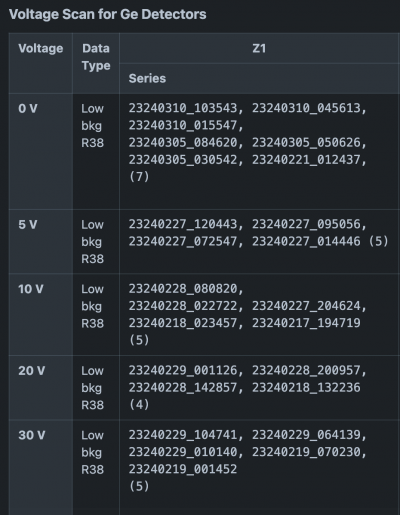
- From Confluence Page on Run 38, the voltage scan series from this page is used, starting with 0V low background dataset
- Location of datasets:
- s3df: /sdf/data/supercdms/workarea/analysis/CUTE-T3/processing
- Cedar/Fir: /project/rrg-mdiamond/data/analysis/CUTE-T3/processing
- Relative Calibration factors are taken from this note
- Steps to template generation notebook link
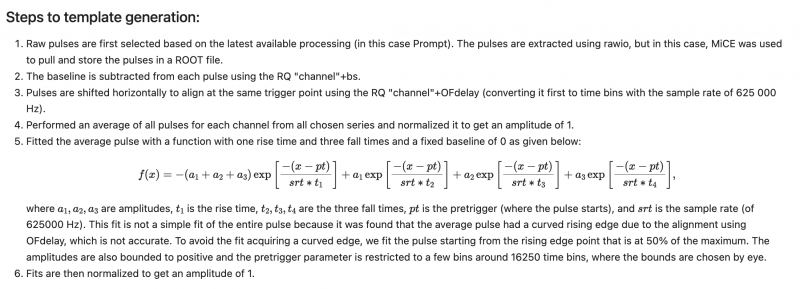
- Addition quality cut on radial parameter is done to select events closer to center of detector as a starting point.
- Series list used:
- series_list = ['23240310_103543', '23240310_045613','23240310_015547', '23240305_084620', '23240305_050626','23240305_030542','23240221_012437']
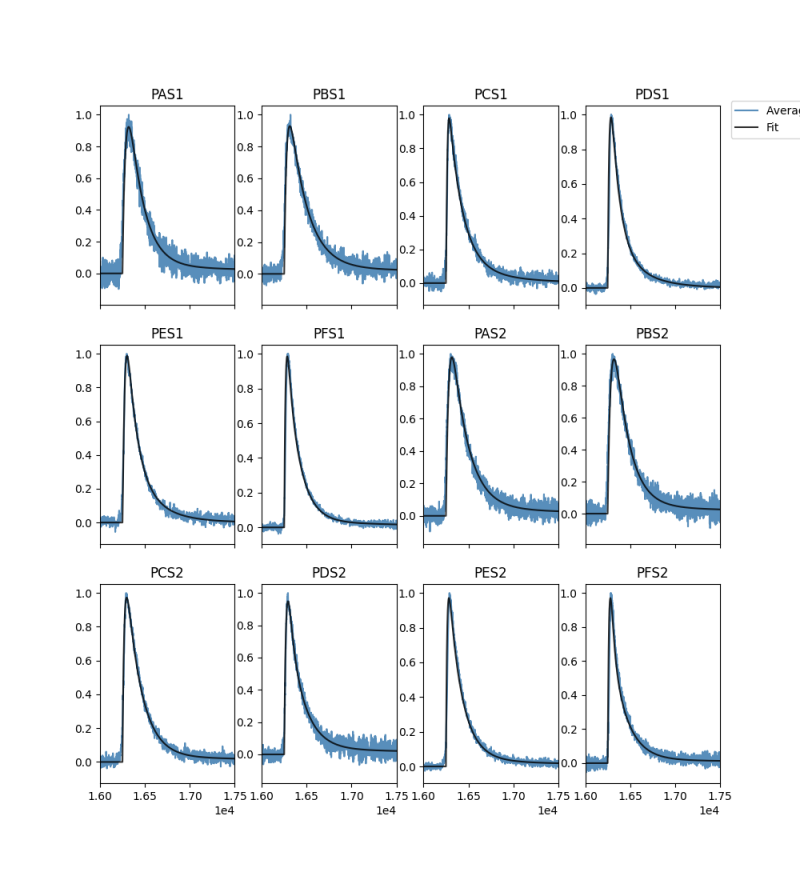
- Generated Templates

| Arguments used in the CDMSG4DMC command: Voltage: -35 V,PREFIX test, RUNID 1, SUBGAPABS?? |
For HVeV4mm, Argument for /CDMS/HVeV/DetectorConfig will be HVeV4mm assigned for“1 cm square x 4 mm thick” mask.
CDMS/Zip/UseLattice [true|false] Attach lattice configuration to ZIPs, generate and track phonons and charge carriers. NOTE: This command automatically enables the electrode configuration above.
CDMS/Zip/Lattice/Orientation h k l zipID …
h,k,l = Miller indices for lattice orientation along +Z axis zipID = indices of ZIPs with this orientation (-1 or omitted means all) NOTE: If omitted, lattice orientations will be determined from the ZIP detector type
CDMS/Zip/EMField/Voltage volts unit zipID …
volts = Total voltage bias along +Z axis unit = V, mV, kV zipID = indices of ZIPs with this voltage (-1 or omitted means all) NOTE: If omitted, detector voltage settings will be determined from the ZIP detector type NOTE: If setting voltage changes what is preset for the detector, the corresponding top and bottom biases will be scaled to match the new total value
sub-gap phonon absorption by the TES, i.e. the probability to directly absorb a phonon by tungsten (instead of absorption by aluminum). Warren's optimization found that the long tail of subgap phonon collection was best reproduced with subgapAbs = 0.0365